Start Here
Mahjong 4 Friends Quick Start
This guide covers the basic of Mahjong 4 Friends.
Start a Room
Mahjong 4 Friends supports both American Mahjong, played with a card, and Chinese, British, and Hong Kong styles, where mahjong hands are 4 sets (pongs, kongs, chows) and a pair, or special hands. To get started with either style, create a room, select the button for either the Chinese variants or American Mahjong, and click "Start Game".

The game board is created, the wall built, and the hands automatically dealt. Instructional bubbles are provided on the game board to help guide players through the steps of the game.
Chinese / British / Hong Kong Styles
Chinese, Hong Kong, and British style mahjong is played with 144 tiles. There are three suits: circles, bamboos, and characters. There are also honors tiles: winds (north, south, east, west) and dragons (red, green, white).
Each suit has tiles numbered 1-9. There are 4 of each tile in a suit, and 4 of each wind and dragon. There are also 8 pretties (flowers and seasons). Pretties are singleton tiles that give you extra points and are automatically handled by the software.
The objective of the game is to build a Mahjong hand consisting of 4 sets and a pair. The sets can be 3 of a kind (a matching pong), 4 of a kind (a matching kong), or a sequence of 3 tiles of the same suit, such as 1-2-3 circles or 3-4-5 bamboo.
Example hand: an exposed pong of 8 circles, an exposed pong of 1 characters, an in-hand concealed pong of green dragons, a 5-6-7 character sequence, a pair of 7 bamboos, and 2 pretties.
Chinese / British / Hong Kong Turn Flow
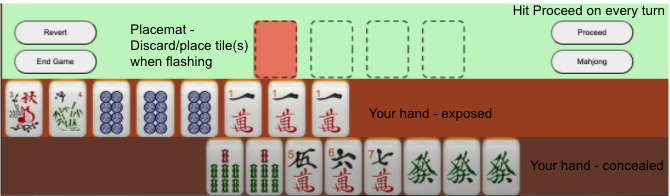
- Play proceeds counterclockwise, starting with East wind. The player whose turn it is is highlighted in red on the compass in the upper right.
- East wind starts the game by discarding a tile as indicated by the flashing box in the placemat. To discard a tile, tap on the tile to move it to the placemat and hit Proceed.
- If you have no play on the discarded tile, hit Proceed.
- If the discarded tile creates a 3 of a kind or a 4 of a kind, you can use the tile to meld a pong or a kong. To meld a pong or kong, tap the matching tiles in your hand to move them to the placemat and hit Proceed.
- If it is your turn next and the discarded tile creates a sequence, you can meld a chow. To meld a chow, tap the sequential tiles in your hand to move them to the placemat and hit Proceed. Pongs take precedence over a chow, except for mahjong. If someone else melds a pong, you will get an error message that you cannot meld the chow. Just tap your tiles to return them to your hand.
- All players must hit Proceed on every turn before the turn moves on.
- After all players hit proceed, any melded pong, kong, or chow is exposed and the turn moves to the player who melded. Other players may be skipped. The player will discard without drawing a tile from the wall because the melded tile counts like a draw from the wall.
- If no player melded, play moves counterclockwise. A tile is automatically drawn from the wall and placed in the hand, and a message is displayed. A tile is then discarded and steps 3-8 are repeated. Again, all players must hit Proceed before play continues.
- If it is your turn next and the discarded tile is the 4th tile matching an already exposed pong, hit Proceed and your melded pong is upgraded to a kong. A replacement tile is automatically drawn. It must be your turn next or the discarded tile becomes dead.
- In-hand pongs and in-hand chows remain concealed.
- If you draw an in-hand kong, you will want to expose it so you get a replacement tile. Tap all 4 tiles in your hand to move them to the placemat and hit Proceed. It will be scored as an in-hand kong by the software. It is then your turn to discard.
- If the discarded tile is your Mahjong tile, tap the matching tile or tiles (pong, chow, pair) to move them to the placemat and hit the Mahjong button.
- If you draw your own Mahjong tile, hit the Mahjong button.
Scoring
The software scores as follows, but feel free to use your own scoring.
| Tiles | Melded #2-#8 | Melded 1s, 9s, winds, dragons | In Hand #2-#8 | In Hand 1s, 9s, winds, dragons |
|---|---|---|---|---|
| Pong (3 matching tiles) | 2 | 4 | 4 | 8 |
| Kong (4 matching tiles) | 8 | 16 | 16 | 32 |
| Sequence (same suit) | 0 | 0 | 0 | 0 |
| Pairs (matching tiles) | 0 | 2 if own wind | 0 | 2 if own wind |
| Pretties | 4 | 4 | 4 | 4 |
Mahjong Points
- 20 points for mahjong
- 10 additional points for no chows (sequences)
- 2 points for drawing your own mahjong tile
Doubles
- Clear hand: all one suit, or all #1s and #9s mixed suits plus honors
- Pong or kong of dragons or the player's own wind
- Pretty of player's hand: east = 1, south = 2, west = 3, north = 4
- Three doubles: clear hand with no honors and no winds or dragons
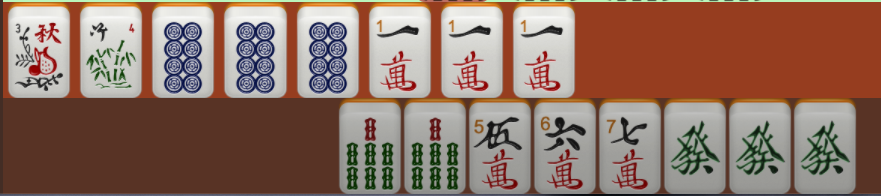
Example scoring:
- Pong of 8 circles: 2 points
- Pong of 1 characters: 4 points
- Pong of green dragons: 8 points
- Sequence of 5-6-7 characters: 0 points
- Pair of 7 bamboos: 0 points
- Pretty #3: 4 points
- Pretty #4: 4 points
- 2 + 4 + 8 + 8 = 22
- 22 + 20 for mahjong = 42
- 42 x 2 for the dragon double = 84 total points
American Mahjong
American mahjong is played with 152 tiles. There are three suits: dots, bams, and cracks. There are also honors tiles: winds (north, south, east, west) and dragons (red, green, white). Each suit has tiles numbered 1-9. There are 4 of each tile in a suit, 4 of each wind and dragon, 8 flowers, and 8 jokers.
The objective of the game is to build a Mahjong hand matching one of the patterns on a card. Mahjong 4 Friends scoring and bots support the National Mah Jongg League 2020 and 2021 cards. Use the drop down game setting to select between the available cards.
When You Start a Game
- Play proceeds counterclockwise, starting with East wind. The player whose turn it is is highlighted in red on the compass in the upper right.
- Play starts with one-three charleston rounds. Follow the directions in the instructional bubbles for each pass in the charleston and for each round. To charleston, tap on three tiles to move them to the placemat and hit Proceed. Read the instructional bubble for how to block charleston rounds or pass fewer tiles.
- To keep tiles from the charleston, tap the tiles in the placemat to move them to your hand. Tap your tiles for the next charleston pass to move them into the placemat and hit Proceed.
- At the conclusion of the charleston rounds, your final tiles are added directly into your hand. You may drag and drop the tiles within your hand to order them.
- At the conclusion of the charleston, East wind starts the game by discarding a tile as indicated by the flashing box in the placemat. To discard a tile, tap on the tile to move it to the placemat and hit Proceed.
- If you have no play on the discarded tile, hit Proceed.
- If the discarded tile creates a match for the hand you are building from your card, you can call the discarded tile to meld a pong, kong, or quint. Tap the matching tiles, or jokers, in your hand to move them to the placemat and hit Proceed.
- All players must hit proceed on every turn before the turn moves on.
- After all players hit proceed, any melded pong, kong, or quint is exposed and the turn moves to the player who called the tile. Other players may be skipped. The player will discard without drawing a tile from the wall because the called tile counts like a draw from the wall.
- If no player calls a tile, the tile is dead and play moves counterclockwise. A tile is automatically drawn from the wall and placed in the hand, and a message is displayed. A tile is discarded and steps 5-9 are repeated. Again, all players must hit Proceed before play continues.
- When it is your turn, you have an opportunity to swap a matching tile for your own or another player's exposed joker. To swap a joker, tap the matching tile from your hand into the placemat, hit the "Swap Joker" button, and choose the player to swap with. The joker will be added to your hand.
- If the discarded tile is your Mahjong tile, tap the matching tile or tiles to move them to the placemat and hit the Mahjong button.
- If you draw your own Mahjong tile, hit the Mahjong button.
Variants
These options are supported by game room settings or in play overrides.
- Sequences: default is unlimited. To limit sequences, select the number.
- Seating positions: default keeps seating order and rotates East wind unless East wins. This setting can also assign winds randomly between games, which is useful if you do charlestons.
- Charleston: East wind initiates a charleston by dragging 3 tiles to the placemat and hitting proceed. Other players then drag their 3 tiles and hit proceed. Each round in a charleston is 3 passes. The Chinese variants are limited to one charleston round. The setting also controls if bots can initiate a charleston. American mahjong can have up to three charleston rounds, and the bots will always charleston.
- Special hands: use the Mahjong button override feature and your own scoring.
If you still have questions, please contact Contact support.