7 Best Mahjong Apps We Played and Ranked
Most people looking for a Mahjong app aren't trying to replace their game night — they're trying to get ready for it. A good Mahjong app gives you a place to work on recognizing tiles, choosing a hand, tracking discards, and building confidence between in-person games. To help you find the best Mahjong app for your needs, we tested out multiple ones, limiting our search to apps with enough player reviews to judge fairly and with broad enough device support to recommend to a group.
Based on our criteria, Mahjong 4 Friends is our pick for the best overall Mahjong app. It supports American, Chinese, Hong Kong, and British Mahjong and lets you practice with computer players, invite friends, join a public table, or combine people and bots in the same game. However, the best choice depends on how you play, so we also compared apps for focused American Mahjong practice, traditional Chinese play, and competitive Riichi Mahjong.
Keep in mind that many apps labeled “Mahjong” are actually Mahjong Solitaire, a single-player matching game in which you remove pairs of unblocked tiles, so make sure the app you choose supports American Mah Jongg, Chinese Mahjong, or whatever variant you prefer.
The 7 Best Mahjong Apps for Learning, Practice, and Real-Table Play
The Mahjong app that works best for you depends on which style you want to play, whether you want to drill the card alone or play with other people, cost, and more. So we’ve set up the following list based on our experience playing on these apps. All apps included had ratings of 4+ stars, and this table helps you review each one at a glance.
| App | Best for | Mahjong Style | Ways to Play | Platforms |
|---|---|---|---|---|
| Mahjong 4 Friends | Best overall Mahjong app | American, Chinese, Hong Kong, British, and Panama | Friends, public players, bots, or mixed tables | iOS, Android, web |
| American Mahjong Practice | Structured solo practice | American | Single-player practice against bots | iOS, Android |
| Real Mah Jongg | Established American Mah Jongg multiplayer | American | Friends, community players, bots, or mixed tables | iOS, Android |
| The Mahjong App | Gamified American Mah Jongg practice | American | Single-player practice against bots; multiplayer announced | iOS, Android |
| Mahjong 13 Tiles | Free, basic Chinese Mahjong practice | International-style Chinese | Single-player practice against computer opponents | iOS, Android |
| Mahjong Soul | Competitive riichi Mahjong | Japanese riichi | Public matchmaking, ranked play, private games, and computer practice | iOS, Android, web |
| MAHJ: Learn American Mah Jongg | Guided learning for absolute beginners | American | Interactive lessons, drills, hand analysis, and guided practice against bots | iOS, Android |
1. Mahjong 4 Friends: Best Overall Mahjong App
Best for: Players who want the greatest flexibility in rules, opponents, and devices for free
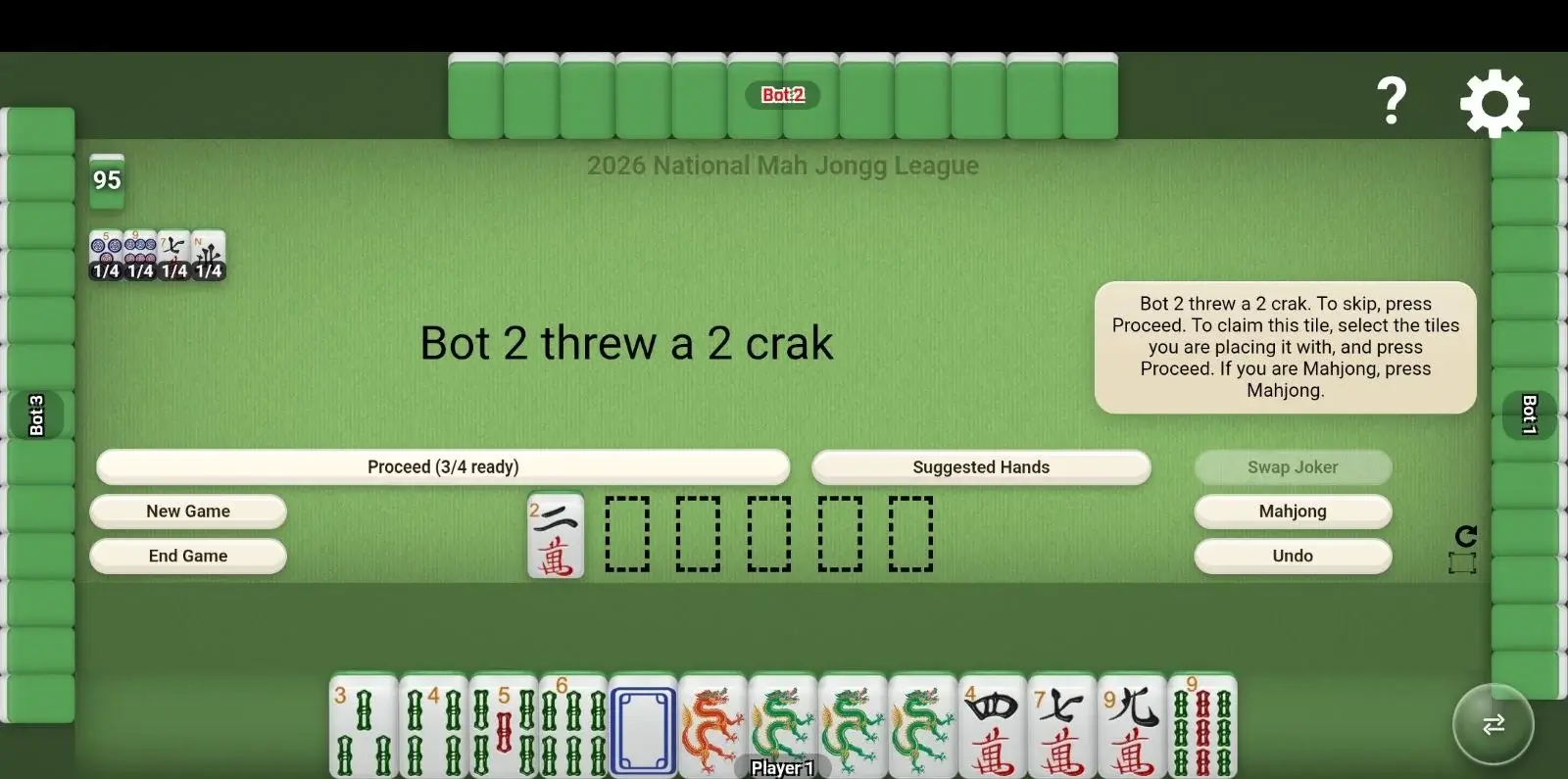
Mahjong 4 Friends earns the top spot because it comes closest to keeping an entire Mahjong table available whenever you want it. You can play American Mah Jongg using the current NMJL or Marvelous card, switch to Chinese, Hong Kong, Panama, or British rules, and choose friends, public players, bots, or a mixture of people and bots for the same room. It’s also the only app with 21,000+ ratings that allows you to play with the current NMJL card for free.
The full-table view makes it easy to follow the game. Your tiles, opponents’ exposures, and discards remain accessible without turning normal play into a series of separate screens. Suggested hands and prompts can help beginners, while adjustable settings allow experienced groups to create a game that resembles their regular table.
Most importantly, regular play is not locked behind a subscription. The free version includes unlimited games with limited advertising. Optional upgrades remove ads and add benefits, but players do not have to pay each year simply to keep playing the current card.
Cost
- Free with limited ads and unlimited play
- Optional ad-free or premium purchases; current offers vary by platform
Key Features
- American Mah Jongg with current NMJL and Marvelous cards
- Chinese, Hong Kong, and British Mahjong settings
- Private rooms, public tables, AI opponents, and mixed human/bot games
- Built-in suggestions and rule prompts for newer players
- Adjustable rules, speed, difficulty, tile designs, and other table settings
- Cross-device online play plus offline games against AI players
Platform Availability
- iOS
- Android
- Web
Ratings & Reviews
- Apple App Store: 4.9 stars from ~21,000 ratings
- Google Play: 4.8 stars from ~1,700 ratings with more than 100,000 downloads
- Players frequently praise its beginner support, flexible settings, and ability to play with friends or bots.
2. American Mahjong Practice: Best for Structured Solo Practice
Best for: American Mah Jongg players who want to drill the card and practice without an internet connection
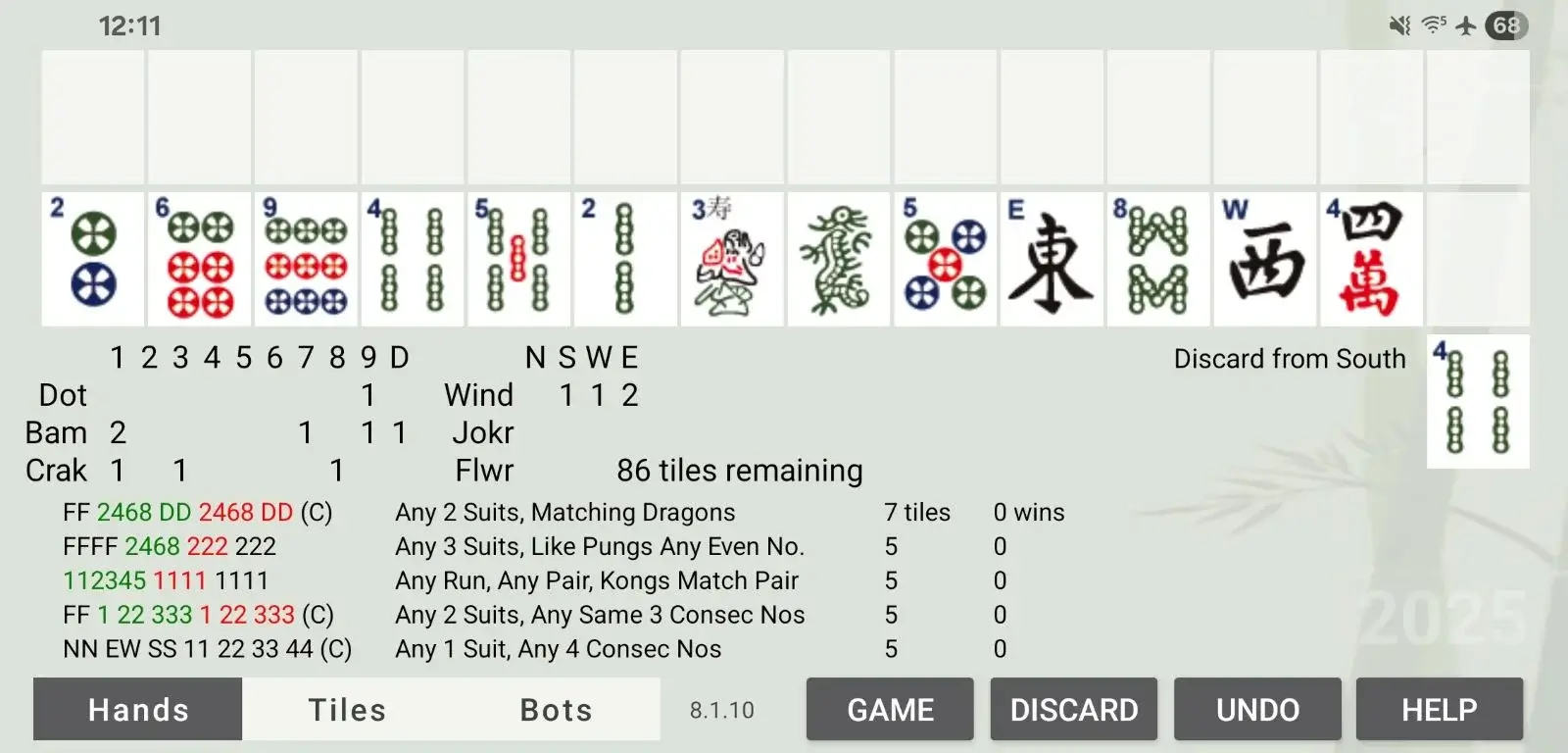
American Mahjong Practice by Eight Bam has one clear purpose: helping players become more comfortable with American Mah Jongg. It offers suggested hands, rule alerts, replay and undo tools, statistics, daily challenges, and an optional defense mode. Because games are played against bots, you can practice privately and at your own pace.
The interface, however, divides information across several views. During our testing, we had to tap Bots to inspect other hands and Tiles to view a suggested hand in tile form. Discards appeared as tally marks in a grid rather than as a familiar table of visible tiles. That may work for players who like a compact mobile interface, but it makes the full state of the game harder to absorb at a glance.
Cost is another important distinction. The app offers an older card for free, but current-year hands require either a one-time annual purchase or a monthly subscription. A purchase prompt also appears before each new game in our testing. This is a capable study tool, but it’s not a multiplayer replacement for a weekly group.
Cost
- Playing with previous-year’s card available free
- Current 2026 card: $14.99 one-time purchase
- Subscription with current and future hands: $2.99 per month
Key Features
- Solo American Mah Jongg games against AI opponents
- Suggested hands, rules, tips, section filters, and tile view
- Replay, undo, statistics, and winning-hand tracking
- Optional bots that can win, allowing defensive practice
- Offline play
Platform Availability
- iOS
- Android
Ratings & Reviews
- Apple App Store: 4.9 stars from ~22,000 ratings
- Google Play: 4.3 stars, with more than 10,000 downloads
- Players frequently praise its hand suggestions and structured practice tools, although some find the interface and current-card paywall frustrating.
3. Real Mah Jongg: Best for a Social American Mah Jongg Multiplayer Experience
Best for: American Mah Jongg players willing to pay for a multiplayer community
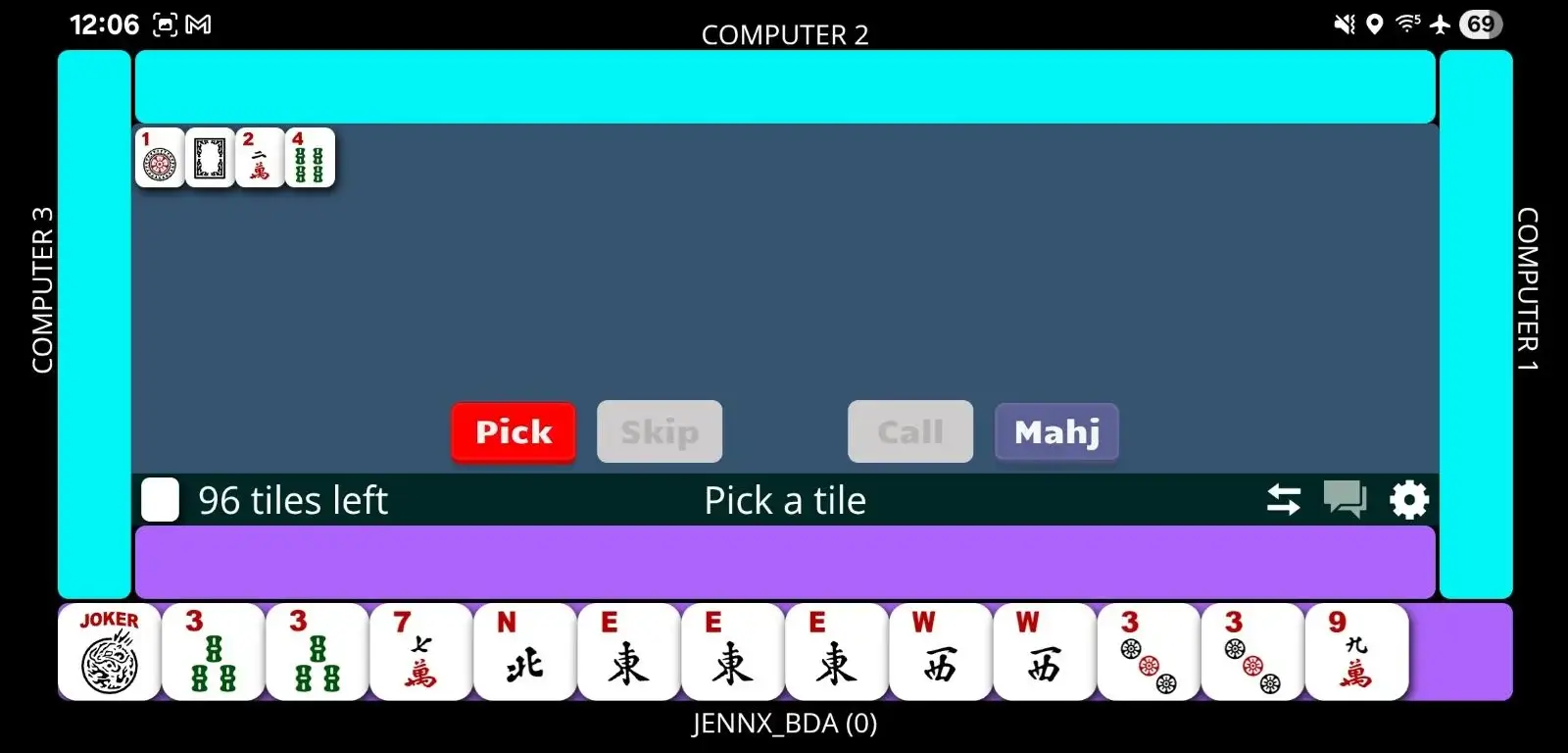
Real Mah Jongg provides a traditional American Mah Jongg experience using the current card, but you must use your own physical card for reference. Players can practice against computer opponents, join games with other subscribers, or combine friends and computer players. Multiple speeds make it possible to slow the game down while learning or move more quickly after you know the card.
The app also supports voice and text chat, which helps an online game feel more social, and it tracks the hands you complete. Its largest drawback is price. After the free trial, continued access requires a recurring subscription. That makes it considerably more expensive than free options, particularly for someone who wants only occasional practice. You also have to use your own card, and if you’re just learning, you may not even have one yet.
Cost
- Free two-week trial
- $6.99 per month after the trial through the U.S. Apple App Store
- $5.99 per month after the trial through the U.S. Google Play Store
Key Features
- Current-card (bring your own) American Mah Jongg
- Games with friends, community players, computer opponents, or a combination
- Voice and text chat
- Multiple playing speeds and tile designs
- Scorecard for tracking completed hands
Platform Availability
- iOS
- Android
Ratings & Reviews
- Apple App Store: 4.7 stars from ~5,300 ratings
- Google Play: ~4.4 stars with 50,000+ downloads
- Players appreciate its current-card practice and multiplayer options, although some report technical glitches and consider the subscription expensive.
4. The Mahjong App: Best for Gamified American Mah Jongg Practice
Best for: Players who enjoy achievements and solo progression
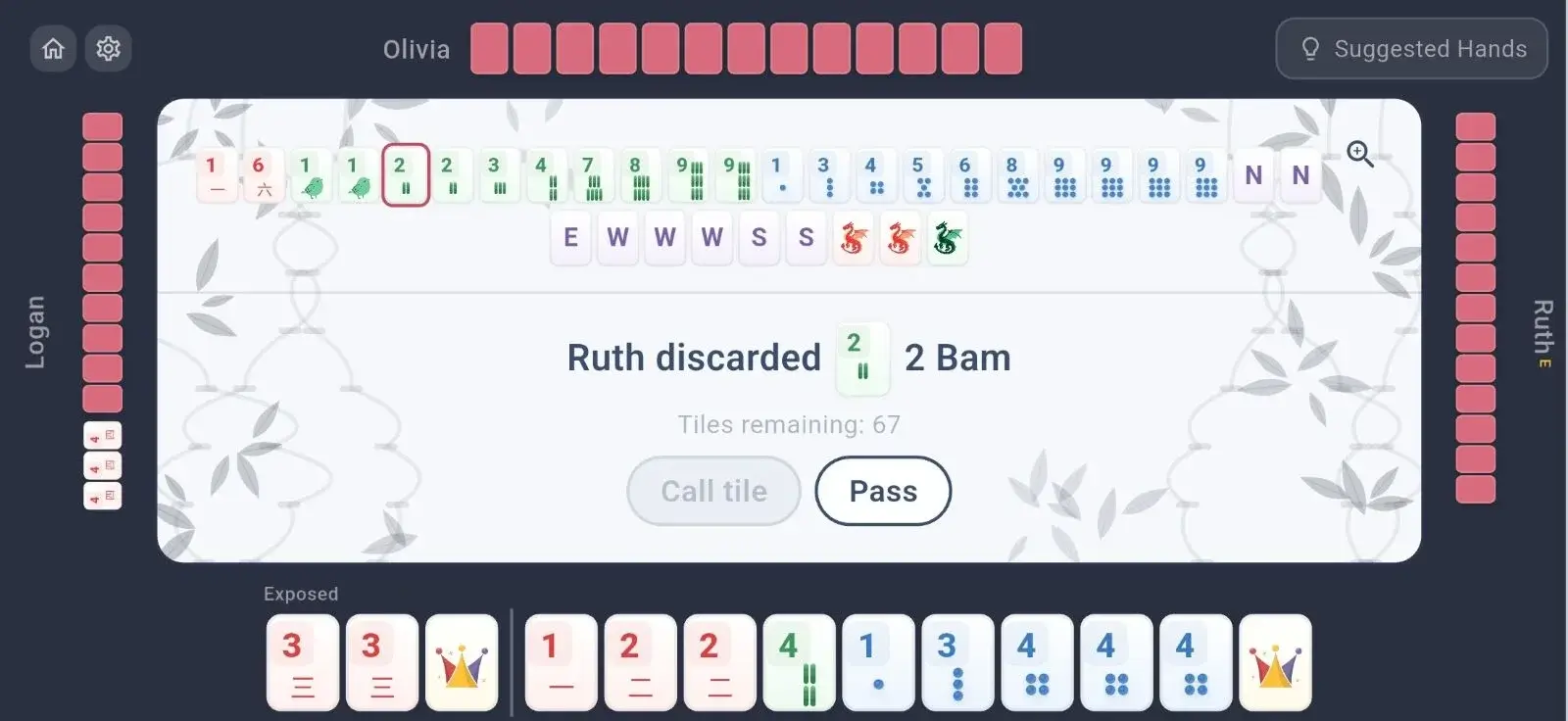
The Mahjong App is a newer American Mah Jongg practice option with the current card, several AI difficulty levels, suggested hands, badges, levels, and progress tracking. The built-in tutorial and explanations for unavailable moves may appeal to beginners who want more guidance than a bare virtual table provides.
We found the visual design less practical than the feature list suggests. The stylized tile art was not always immediately recognizable, and after the Charleston, the tiles compressed in a way that made them difficult to read. Although the app lets players open separate views for discards and other players’ exposures, that still requires moving away from the main rack rather than seeing the entire table continuously.
The app currently supports games against AI opponents, and the multiplayer beta version has just been released, so this is best considered a solo practice app rather than a way to gather your regular group online.
Cost
- Free with advertising
- One-time $14.99 in-app purchase to remove ads
Key Features
- American Mah Jongg with current-card support
- AI opponents with multiple difficulty levels
- Suggested hands, tutorial content, and rule explanations
- Badges, levels, achievements, and card-completion tracking
- Custom bot names and progress syncing
- Multiplayer in beta version
Platform Availability
- iOS
- Android
Ratings & Reviews
- Apple App Store: 4.9 stars from ~4,300 ratings
- Google Play: 4.9 stars from 251 ratings
- Players praise its beginner-friendly guidance and suggested hands, although some find the tile artwork and animations distracting.
5. Mahjong 13 Tiles: Best Free App for Basic Chinese Mahjong Practice
Best for: Players who want a free, offline introduction to international-style Chinese Mahjong
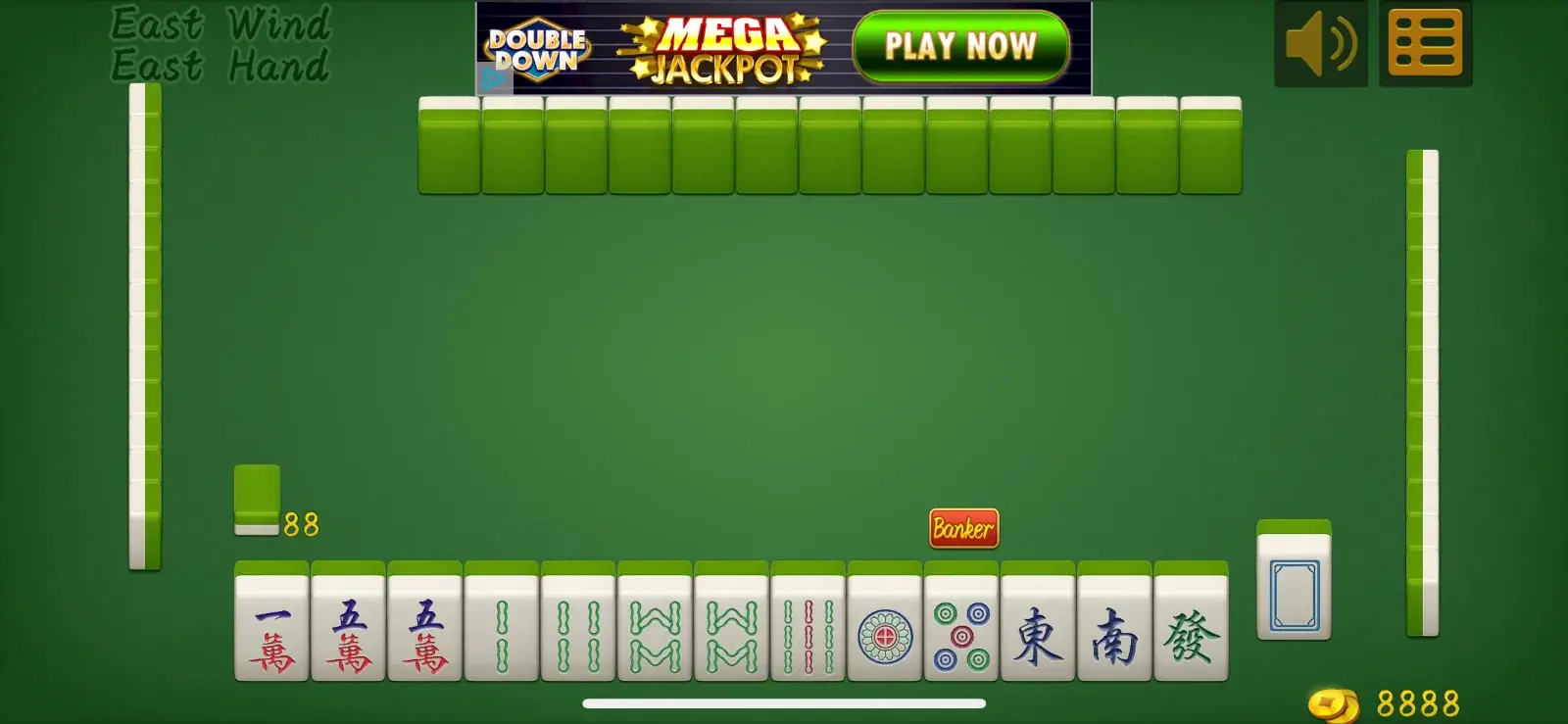
Mahjong 13 Tiles is the only app in this comparison devoted to international-style Chinese Mahjong rather than American Mah Jongg. It uses the familiar structure of chows, pungs, and a pair, and it includes scoring information, computer opponents, and discard suggestions. It’s also free, although ads run across the top, and it can be played offline.
The experience is functional but basic. In our testing, the character tiles were difficult to identify by number, so a player who does not already recognize the characters may struggle to see which tiles can form a chow. The app suggests discards, but those suggestions didn’t always appear to be the strongest strategic choice.
For an experienced player who wants a simple offline game, those limitations may be manageable. A true beginner may need a separate tile-identification guide and should treat the automated suggestions as prompts to consider, not unquestionable advice.
Cost
- Free
- Contains advertising
Key Features
- International-style Chinese Mahjong rules
- Computer opponents and offline play
- Scoring-hand references and assistant features
- Optional discard suggestions
- Statistics, leaderboards, and achievements
Platform Availability
- iOS
- Android
Ratings & Reviews
- Apple App Store: 4.4 stars from ~650 ratings
- Google Play: ~4.3 stars from 1,200-plus reviews and 100,000+ downloads
- Players appreciate its free, authentic Chinese Mahjong gameplay, although some find the tiles difficult to read and the learning guidance limited.
6. Mahjong Soul: Best for Competitive Riichi Mahjong
Best for: Players who want Japanese riichi rules, online matchmaking, rankings, and frequent events

Mahjong Soul is built around Japanese riichi Mahjong, a ruleset with requirements and scoring systems that differ substantially from American Mah Jongg and many Chinese variants. It offers public matchmaking, private games with friends, ranked play, and practice against computer opponents, making it one of the most developed choices for players specifically interested in riichi.
The presentation is much more game-like than the other apps in this comparison. Anime-style characters, voice lines, collectible cosmetic items, collaborations, and seasonal events surround the Mahjong table. Some players enjoy that sense of progression and community, while others may find it distracting if they want a simple digital version of a weekly in-person game.
Mahjong Soul is free to play, but it includes optional purchases, primarily for characters and cosmetic items. It’s available across mobile devices and the web.
Cost
- Free to play
- Optional in-app purchases for characters and cosmetic items
Key Features
- Japanese riichi Mahjong rules
- Casual and ranked online matchmaking
- Private games with friends
- Practice games against computer opponents
- Rankings, events, tournaments, and alternate game modes
- Anime-style characters, voice acting, and collectible customization
Platform Availability
- iOS
- Android
- Web
Ratings & Reviews
- Apple App Store: 4.9 stars from ~11,000 ratings
- Google Play: 4.6 stars from ~27,800 reviews and 500,000+ downloads
- Players praise its polished riichi gameplay, competitive matchmaking, and frequent events, although its anime presentation and cosmetic purchases may not appeal to everyone.
7. MAHJ (Learn American Mah Jongg): Best for Learning American Mah Jongg from Scratch
Best for: Beginners who want structured lessons and interactive guidance before they sit down at a real table
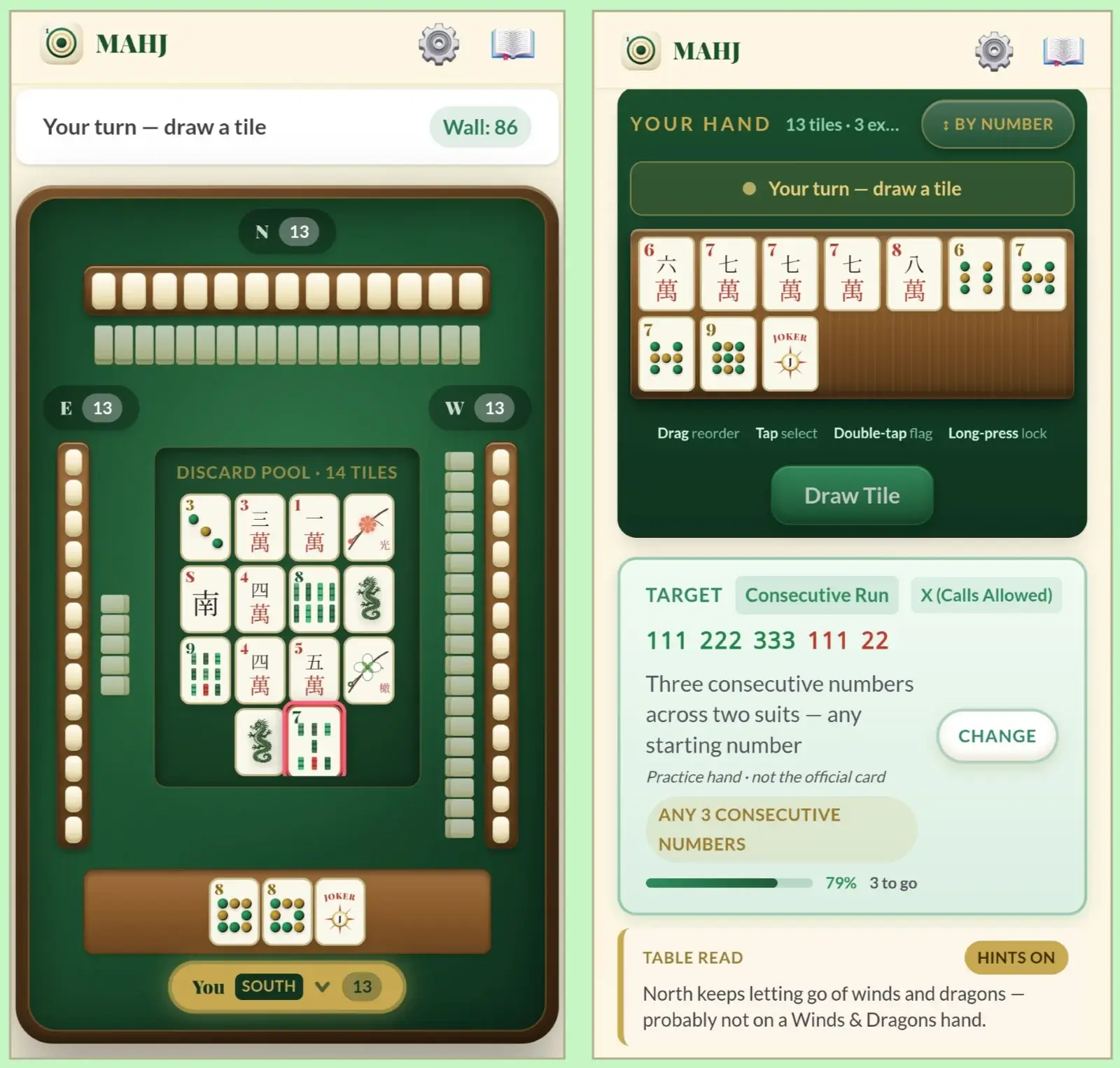
Most apps in this comparison have accumulated hundreds or thousands of ratings, but MAHJ is a newer release (April 2026) with a much smaller review pool. We made an exception because its structured lessons and interactive guidance offer something especially valuable for absolute beginners. MAHJ is more of a complete learning program than a standard Mahjong game, which may appeal to some people who need actual, detailed instruction instead of guidance during gameplay.
You can choose to play for free or begin with short, interactive lessons covering the tiles, the NMJL card, the Charleston, Jokers, calling tiles, scoring, and other essentials. A few introductory lessons are available free, allowing new players to learn the basics before deciding whether to unlock the complete course.
The app’s strongest feature is the guidance it provides while you practice. It can show which hands on the card most closely match your tiles, suggest which tiles to keep or discard, and help you decide what to pass during each exchange of the Charleston. Players can skip some guidance when they no longer need it, making the app useful both for complete beginners and for players who want help with specific parts of the game. This is the only app that functions in portrait mode, which allows you to see the board and then seamlessly scroll down for your hand, tips, and more without missing or compressing information.
Some lessons and tools require a paid upgrade, so MAHJ may not be the best option for someone looking only for a free game. However, the one-time cost is relatively modest for the amount of instruction included. For players who are serious about learning American Mah Jongg and learn games best through lessons and a heavily guided format, it can be a useful teaching tool. In our experience, the instruction during gameplay leaned too heavily into informing you of what to do next instead of explaining why that move is best. So it may not build a lot of confidence in gameplay.
Cost
- Free download with the first three lessons, tile-recognition drills, a daily puzzle, a glossary, and a printable cheat sheet
- $4.99 one-time premium purchase to unlock the complete lesson set and additional learning tools
Key Features
- 18 interactive lessons covering American Mah Jongg from setup through complete gameplay
- Guided practice against three computer opponents
- Hand Analyzer that identifies which NMJL card hands most closely match your tiles
- Suggestions for choosing discards and passing tiles during the Charleston
- Tile-recognition drills, daily puzzles, and a searchable glossary
- Built-in coach for American Mah Jongg rules questions
- Scoring calculator and printable game-night cheat sheet
- Options to skip or reduce guidance as your skills improve
Platform Availability
- iOS
- Android
Ratings & Reviews
- Apple App Store: 4.9 stars from ~280 ratings
- Google Play: 4.7 stars from ~10 reviews
- Players frequently praise its clear, step-by-step lessons and interactive practice tools for making American Mah Jongg feel less overwhelming.
How to Choose the Best Mahjong Apps
An app with a high rating or interesting artwork on its tiles may not actually be the best choice for you. If you want to find a Mahjong app that best suits what you’re looking for, even if you’re not sure what you want, these sections help you consider which elements should drive your choice.
Choose the Right Mahjong Variation/Style
Not all Mahjong games play the same way. American Mah Jongg uses a card of approved hands, Jokers, and the Charleston tile exchange, while Chinese and other traditional variants generally require four sets and a pair, with rules governing chows, pongs, kongs, special hands, and scoring. But if you want the competitive riichi game, it could feel like a whole different world. So if you know for sure you want one Mahjong variation over the others, then narrow your choices to the apps that provide it. However, just because an app is dedicated solely to one style of play doesn’t mean it’s the best choice. Some apps like Mahjong 4 Friends include several variations so you can enjoy learning and playing multiple styles of the game.
Decide If You Need Practice Time or Live Table Time
Bots are useful when you want a quick game, need time to study a hand without holding anyone up, or can't get a full table of four players, which, for most players, is most of the week. Multiplayer matters when conversation, table etiquette, and adapting to human decisions are part of the experience. If you’re just learning the game, you probably want an app that does both so you can learn the game and practice with bots but then engage with other players when you feel more confident. With Mahjong 4 Friends, you can use bots all the time, engage with a full table of real people, or just fill empty seats with bots without preventing friends from joining.
Prioritize the Features You Need
Mahjong requires you to track your hand, exposures, and discarded tiles at the same time. Large tiles are helpful, but not if the app hides other information behind several buttons. Choose a layout that lets you recognize tiles quickly and understand what has already left the wall, because the habits you build on a screen are the habits you'll bring to a physical table. Experienced players may not need suggested hands but want to see other players’ exposures and whole tiles that get discarded, and beginners may appreciate features that offer guidance and support to learn while you play.
Consider What Is Included in “Free”
A free download may include unlimited current-card play, an older card, a limited number of games, or only a trial. Compare the continuing cost of the app, especially when a new American Mah Jongg card must be added each year.
Practice Now, Play Better with the Best Mahjong App
The best Mahjong app should build habits you can carry to a real table, not make you fight the interface before every discard. Mahjong 4 Friends keeps the experience flexible. You can practice against AI, invite your regular group, join other players, or switch between American and traditional styles without finding a new app. You can always play Mahjong for free online with Mahjong 4 Friends or download the app for iOS or Android.